Mined Command reference (command and key function assignments)
-
General note on using keys with Control, Shift, Alt modifiers:
Mined makes use of many key combinations modified with
Control, Shift, Alt, or a combination of them, as a resource
for invoking a larger number of specific functions, providing
modified functionality as well as accented character input
support.
Some of these key combinations may be limited by local
environment, especially the window system, or may need
extra configuration to be enabled.
Especially modified function keys are often intercepted by
window systems for special functions.
In general, mined interprets an ESC prefix as an alternative
for an Alt-key combination. For further advice and window system
specific hints on further remedies, as well as configuration hints,
to enable modified key input see the
hint box under Accent prefix keys above.
Generic command modifiers (esp. HOP key)
- ^Q or ^G or "5" (on keypad) or Menu (in Linux) or * (on keypad) or Shift-TAB
- HOP key (except ^G followed by a digit).
In order to enable the "5" key to invoke the HOP function, or
assign the HOP function to another key (e.g. on laptops which
lack the numeric keypad), some configuration may be necessary;
see Keypad configuration below.
- ESC
- Prefix for subsequent "letter commands".
Also: Generic prefix for "Alt" modified command (to
apply to a subsequent command for which the terminal does not
support the Alt key).
- ^V
- (Prefix for control character input, but also:)
Generic prefix for "Control" modified command (to apply to
a subsequent command for which the terminal does not support
the Control key).
- Ctrl-< punctuation key >
- (Set of accent prefix keys to enter composed characters.)
Cursor and screen motion
- ^E or cursor-up
- Move cursor 1 line up.
- … with HOP:
- Go to top of page.
- ^X or cursor-down
- Move cursor 1 line down.
- … with HOP:
- Go to bottom of page.
- ^S or cursor-left
- Move cursor 1 character left.
- … with HOP or Ctrl-Home
- Go to beginning of line.
- ^D or cursor-right
- Move cursor 1 character right.
- … with HOP or Ctrl-End
- Go to end of line.
- ^A or Shift-cursor-left (on small keypad)
- Move word left (to preceding beginning of a word).
- … with HOP:
- Go to beginning of sentence.
- ^F or Shift-cursor-right (on small keypad)
- Move word right (to beginning of next word).
- … with HOP:
- Go to end of sentence.
- Ctrl-Shift-cursor-up
- Move backward to previous beginning of paragraph.
- Ctrl-Shift-cursor-down
- Move forward to next beginning of paragraph.
- Shift-cursor-up (on small keypad)
- Go to top of page.
- Shift-cursor-down (on small keypad)
- Go to bottom of page.
- ^R or PgUp or PrevScreen (VT100)
- Scroll backward 1 page (Top line becomes bottom line).
- … with HOP:
- Go to beginning of text.
- ^C or PgDn or NextScreen (VT100)
- Scroll forward 1 page (Bottom line becomes top line).
- … with HOP:
- Go to end of text.
- Home (on small keypad)
- Move to beginning of line.
If already there, move to beginning of previous line.
- Only if keyboard is configured to emit different
control sequences for the two keypads, see
Keypad configuration hints below.
- Ctrl-Home (on small keypad)
- Move to beginning of line.
- End (on small keypad)
- Move to end of line.
If already there, move to end of next line.
- Only if keyboard is configured to emit different
control sequences for the two keypads, see
Keypad configuration hints below.
- Ctrl-End (on small keypad)
- Move to end of line.
 HOP ESC . HOP ESC .
- Center current position vertically on screen.
Navigation support for combined Unicode characters
- Enabling partial editing of base character and combining
characters (accents) in combined display mode.
- Ctrl-cursor-right or ^V cursor-right
- Micro movement:
Move partial character right into Unicode combined character.
- Ctrl-cursor-left or ^V cursor-left
- Micro movement:
Move partial character left over Unicode combining character.
- ^W or Ctrl-PgUp or keypad-Minus (if supported by terminal)
- Scroll screen backward 1 line.
- … with HOP:
- Scroll backward half a screen.
- ^Z or Ctrl-PgDn or keypad-Plus (if supported by terminal)
or
 keypad-Comma (DEC) keypad-Comma (DEC)
- Scroll screen forward 1 line.
- … with HOP:
- Scroll forward half a screen.
- ^G nn Enteror ESC g nn Enter
- Move to a line (prompts for line number).
(Terminate command with Enter or Space.)
- ^G nn % or ESC g nn %
- Move to position in text determined by percentage.
- ^G nn p or ESC g nn p
- Move to page in text (set page length with ESC P).
- ^G < command > or ESC g < command >
- If not immediately followed by a digit, the
positioning command works as an alternative HOP key.
Text marker navigation
- ^G N , or ESC g N ,
- (N=0..15) Set marker N. (Final "m" or "," may be used.)
- ^G N . or ESC g N .
- (N=0..15) Go to marker N. (Final "'" or "g" or "." may be used.)
- ESC m N
- (N=0..9/a..f) Set marker N.
- ESC ' N (deprecated)
- (N=0..9/a..f) Go to marker N.
- HOP Home or ^G ^@ or ^G ^] or HOP ESC ^
- Move to the position previously marked by Home/^@/^]/ESC ^
- ESC Enter or Alt-Enter (Alt-Return) *
- Return backward to the previous position marked in the position stack.
- HOP ESC Enter or HOP Alt-Enter (HOP Alt-Return) *
- Return forward to the next position marked in the position stack.
- * Note that depending on Window system or terminal,
Alt-Enter may be captured as a function to maximize the window.
- left mouse button
- Move cursor to position.
Entering text
- To enable combinations of Control and Shift with the Enter key,
terminal configuration may be needed (see
Unicode line ends).
- < printable char >
- Insert the character at cursor position.
- < Enter > or < LF Linefeed char > or < CR Return char >
- Insert a newline at cursor position, clone
line end type. Apply auto-indentation if enabled.
- Ctrl-Enter (if editing Unicode text)
- Make a new line by inserting a Unicode line separator at
cursor position (unless disabled with
+u-u).
- Shift-Enter (if editing Unicode text)
- Make a new line by inserting a Unicode paragraph separator
at cursor position
(unless disabled with
+u-u).
-
Control-Shift-Enter (if editing Unicode or ISO 8859 text)
- Make a new line by inserting a Next Line character (U+0085).
- Ctrl-Alt-Enter
- Make a new line by inserting a DOS or Unix line end at
cursor position (if editing Unix or DOS file, respectively).
- Ctrl-Shift-Alt-Enter
- Make a new line by inserting a Mac line end at cursor position.
- < Tab char >
- Insert a Tab character at cursor position.
- with option
-+8
or -+4 or -+2:
Tab expansion; insert as many space characters as needed to
fill line up to the next Tab position.
- ^V < Tab char >
- Insert a Tab character (even in Tab expansion mode).
- HOP {, HOP (, HOP [, HOP <
- Enter indented pair of matching parentheses.
- HOP /
- Enter an indented Javadoc comment frame.
- HOP ' or HOP ´ (acute accent)
- Enter an apostrophe (U+2019).
- Note: In smart quotes mode,
´ alone also enters an apostrophe.
- HOP ` (grave accent)
- Enter a glottal stop / 'okina (U+02BB).
- Note: In smart quotes mode,
` alone also enters a glottal stop.
- HOP –
- Underline the line that starts before the cursor position.
- ^O
- Make new line at current position.
If the current line is terminated by a Unicode
paragraph separator, a line separator is inserted.
Auto-indentation is not applied.
- HOP ^O
- Split a line in two binary-transparently, i.e.
enter a "NONE" virtual line end.
Accented character input support by accent prefix keys
- Mined defines a number of function keys, modified function keys,
modifed digit keys, and modified punctuation keys for single
and multiple accent composition with a subsequently entered
character; for a detailed listing and description, see
Accent prefix function keys above.
Up to three accent prefix keys can be combined by entering
them in sequence in order to compose characters with multiple
accents.
- These functions also work on the prompt line (e.g.
to enter search expressions).
- F5 < character >
- Compose character with diaeresis (umlaut accent),
e.g. a » ä
- Shift-F5 < character >
- Compose character with tilde,
e.g. a » ã
- Ctrl-F5 < character >
- Compose character with ring or with cedilla,
e.g. a » å , c » ç
- Ctrl-Shift-F5 < character >
- Compose character with ogonek.
- Alt-Shift-F5 < character >
- Compose character with breve.
- F6 < character >
- Compose character with acute accent (accent d'aigu),
e.g. a » á
- Shift-F6 < character >
- Compose character with grave accent,
e.g. a » à
- Ctrl-F6 < character >
- Compose character with circumflex accent,
e.g. a » â
- Ctrl-Shift-F6 < character >
- Compose character with macron.
- Alt-Shift-F6 < character >
- Compose character with dot above.
- Ctrl-0 ... Ctrl-9
- Compose character with accent, esp. for Vietnamese
accented characters.
- (Ctrl-)Alt-1 ... (Ctrl-)Alt-5
- Compose character with two accents, esp. for Vietnamese
double accented characters.
- (Ctrl-)Alt-6 ... (Ctrl-)Alt-8
- Compose character with two accents for Greek multiple
accented characters.
- Ctrl-< punctuation key >
- Compose character with accent (looking similar to the
modified punctuation character, e.g. Ctrl-, composes
with cedilla, Ctrl-: with diaeresis, Ctrl-minus
with macron, Ctrl-( with breve, Ctrl-< with caron,
Ctrl-/ with stroke, Ctrl-; with ogonek, etc; see
Accent prefix function keys
above for details).
Input support commands
- Ctrl-V special input support
- These functions also work on the prompt line (e.g.
to enter search expressions).
- ^V < control character >
- Enter control character.
- ^V [ or ^V \ or ^V ]
- Enter one of the control characters ^[, ^\, ^].
- ^V ^ ^ or ^V _ _
- Enter one of the control characters ^^, ^_.
- ^V ^ ' or ^V ^ "
or ^V ^ ` or ^V ^ ´
- Enter one of the straight quote marks ' or " or plain accents
(needed in smart quotes mode)
- ^V < accent > < character >
- Compose accented character.
- ^V # xxxx < Space or Enter >
- Enter character defined by a hexadecimal number being input
(depending on applicable encoding, byte value, Unicode
value, or valid CJK code is required).
- ^V # # xxxxxx < Space or Enter >
- Like ^V # but using an octal number.
- ^V # = xxxxx < Space or Enter >
- Like ^V # but using a decimal number.
- ^V # u or U or +
- (followed by a numeric input as described above, with optional
# or = for octal or decimal input) interprets the input as a
numeric Unicode value which is converted into the current
text encoding.
- ^V # ... Space ...
- With numeric character input, mined supports successive
multiple character entry according to ISO 14755 if the
numeric code is terminated by a Space key.
- ^V < function key >
- This is not an input support function but rather the
function key is invoked as if pressed together with the
control key.
- Mnemonic character input support
- Mnemonics recognised include the following:
- RFC 1345 mnemos (except mappings to Unicode private use areas);
in ambiguous cases, the RFC 1345 mnemos must be entered in
long mnemonic input mode, e.g. with "^V pi " rather than "^Vpi"
- HTML mnemos as listed in
HTML living standard, prepended with a "&"
- TeX mnemos (macros) and substitutes, leaving out any "\"
-
groff glyphs (roff special characters), mnemonics beginning with "("
- Supplementary mnemos as listed on the
mined character mnemos page
Unless there is an ambiguous mapping, all two-letter mnemonics
can also be entered in reverse order.
- ^V < Space > < name > < Space or Enter >
- Lookup character mnemonic and enter character. RFC 1345
mnemonics take precedence in ambiguous cases.
- ^V < character > < character >
- Compose two characters. Non-RFC 1345 mnemonics take
precedence in ambiguous cases.
- Note:
A number of mnemonics are defined with already precomposed base
characters (especially for Vietnamese input) which can be used
for further composition.
^V can be applied recursively to compose a character
for further composition.
See examples with æ below for both cases.
- Examples:
- ^V^A
- Enter Ctrl-A.
- ^V^[ or ^V[
- Enter the escape character.
- ^V__
- Enter Ctrl-_.
- ^V'e
- Enter é (e with accent d'aigu).
- ^Vae
- Enter æ (the ae ligature).
- ^V ae' (terminated by Space or Enter)
- Enter U+01FD (æ with acute).
- ^Væ'
- Enter U+01FD (æ with acute).
- ^V ^Vae' (terminated by Space or Enter)
- Enter U+01FD (æ with acute).
- ^V'^Vae
- Enter U+01FD (æ with acute).
- ^VOK or ^Vcm
- Enter the check mark ✓ (U+2713)
- ^Vzz or ^V zigzag (terminated by Space or Enter)
- Enter the downwards zigzag arrow ↯ (U+21AF)
- ^V-,
- Enter ¬ (the negation symbol).
- ^V neg (terminated by Space or Enter)
- Enter ¬ (the negation symbol).
- ^Va* or ^V a* (terminated by Space or Enter)
- Enter the Greek small letter alpha.
- ^V ae' (terminated by Space or Enter)
- Enter the Latin ligature ae with acute accent.
- ^V euro (terminated by Space or Enter)
- Enter the Euro character.
- ^V#20ac (terminated by Space or Enter)
- Enter the character with hexadecimal value 20AC
(which is the Euro character in UTF-8 encoding).
- ^V#U20ac (terminated by Space or Enter)
- Enter the Euro character (which has the hexadecimal
Unicode value 20AC) encoded in the currently selected
text encoding.
- ^V#+20ac < Space > +20ac < Enter >
- Enter two Euro characters in
successive multiple character entry mode (ISO 14755).
Input method (Keyboard mapping) selection
- ESC k or Ctrl-Alt-F12 or middle-click on Input Method flag
- Toggle between current and previously selected input method
(or initially the configured standby input method).
- Note: Alt-k or Ctrl-Alt-F12 also works on prompt line.
- HOP ESC k
- Clear input method, i.e. resets keyboard mapping to none (unmapped input).
- ESC I or ESC K or Ctrl-F12 or right click on Input Method flag (mapping indication in flags area)
- Open the Input Method selection menu.
- Note: (Alt-I or Alt-K or Ctrl-F12 also works on prompt line)
- HOP ESC K
- Cycle through available keyboard mappings / input methods.
Modifying text
- Note on the Home and End keys
- Sometimes people expect the "Home" and "End" keys to move the
cursor to the beginning or end of line, respectively.
In the keyboard usage approach of mined, these functions can
easily and quite intuitively be invoked with "HOP left" and
"HOP right", i.e. by pressing the keypad keys "5 4" or "5 6"
in sequence.
- So there is enough room left for mapping the most frequent
paste-buffer functions to the keypad as described above which
is considered much more useful.
- Use Ctrl-Home and Ctrl-End for the line positioning
functions, depending on terminal support and configuration; or
use the
-k option if preferred to
switch keypad key function assignments for the Home and End keys.
- See Keypad layout above for a
motivating overview of the mined keypad assignment features
and options.
- Backarrow or ^H
- Dual-mode function:
If a visual selection is active:
Cut selected area to paste buffer.
Otherwise:
Delete character left.
Smart backspacing: If there is only blank
space before the current position in the current line
and the line above and auto-indentation is enabled,
the auto-undent function (Back-Tab) is performed
instead, deleting multiple spaces back to the previous
level of indentation.
- Note: Mined tries to map this function to
the Backarrow key on the keyboard whether it is
assigned to the Backspace or DEL control characters,
by inspecting the setting of the terminal interface,
see Automatic backspace
mode adaptation.
- Note:
Configuration option
plain_BS
(command line option +Bp)
switches the Backarrow key from smart backspacing to
plain backspacing, i.e. no auto-undent and only delete
one combining character of a combined character.
Use Shift-Control-Backarrow to perform smart backspacing then.
- Ctrl-Backarrow (if key properly configured) or F5 Backarrow
- "Delete single": Delete only right-most combining accent
of combined character left of cursor position.
If not next to a combined character: delete character left,
avoiding auto-undent function.
- Shift-Ctrl-Backarrow (if key properly configured) or Shift-F5 Backarrow
- "Delete smart": Smart backspacing function as described above
as default behaviour of the Backarrow key.
- Del (on keypad)
- Dual-mode function:
If a visual selection is active:
Cut selected area to paste buffer.
Otherwise:
Delete next character right, including any combining characters.
- Ctrl-Del (on keypads, if key properly configured)
- Delete character right, excluding any combining characters.
- Shift-Del (on small keypad, if key properly configured)
- Cut selected area to paste buffer.
- DEL (ASCII character)
- If detected to be attached to the keyboard Backarrow key:
Delete left. (Or delete visual selection, see above.)
(Enforce with option
-B.)
Otherwise:
Delete right.
- HOP Backarrow
- Delete beginning of line (left of current position).
- ^B
- Delete character right (next character).
- ^T
- Delete next word.
- ^^ (overridden when used as accent prefix, e.g. with newer xterm)
- Delete previous word.
- ^K
- Delete tail of line (from current position to line-end);
if at end of line, delete line end (joining lines).
- HOP ^K
- Delete whole line.
Code conversion
- ESC X
- Insert hexadecimal representation of current character code.
(In UTF-8 mode, this is the UTF-8 byte sequence
of the character in hexadecimal notation.)
- … with HOP:
- Insert character with hexadecimal code
scanned from text at current position.
- ESC U
- Insert (hexadecimal) Unicode value of current character
(with either 4/6/8 hexadecimal digits, depending on the
value); in CJK or mapped 8 bit encoding mode, the
value is transformed from the current text encoding
into Unicode.
- … with HOP or Ctrl-Shift-F11
- Insert character with hexadecimal Unicode value
scanned from text at current position; in CJK or
mapped 8 bit encoding mode, the value is transformed
from Unicode into the current text encoding.
- ESC A
- Like ESC U but inserting an octal Unicode value.
- … with HOP:
- Like HOP ESC U but scanning an octal Unicode value.
- ESC D
- Like ESC U but inserting a decimal Unicode value.
- … with HOP:
- Like HOP ESC U but scanning a decimal Unicode value.
- Alt-x
- Toggle the preceding character and its hexadecimal Unicode value.
The command detects a 2 to 6 hex digit character code with
a valid Unicode value, or a non-digit Unicode character,
respectively.
Case conversion
- ESC C or F11
- Exchange case (low/capital) of character under cursor.
Case mapping is based on Unicode (but applicable in
all text encodings).
Special handling is applied for:
- Greek final s
- Turkish "i" if the effective locale value
(environment variables
LANGUAGE,
TEXTLANG, LC_ALL,
LC_CTYPE, LANG)
begins with "tr" or "az"
or "crh" or "tt" or "ba"
- case mappings to multiple characters
- Lithuanian special conditions (locale value begins with "lt")
- Dutch "IJsselmeer" title casing with Shift-F3
(if the locale value begins with "nl")
- Japanese characters are toggled between Hiragana and Katakana.
- … with HOP or Shift-F11
- Apply case conversion to word from cursor.
- Shift-F3
- Cycle casing of a word between all small, title case,
and all capitals (title case means the first letter is either
capital or actually a Unicode title case, the following letters
are small). For Japanese script, it toggles the word between
Hiragana and Katakana.
Mnemonic and special conversion
- ESC _ or Ctrl-F11
- Mnemonic character substitution replaces the two characters
at the cursor position with a suitable composite
character (e.g. accented character) if possible.
With Ctrl-F11, transformations are the same as with
the ^V two-letter character input mnemonics.
With ESC _, language-dependent preferences may take
precedence (see variations below)
according to the current locale environment.
Example: ae → æ
Special conversion features
- If the text at the cursor position contains an HTML
character tag (starting with "&" and optionally
ending with ";"), it is replaced with the actual
character it represents.
Example: ¬ → ¬
- If the text at the cursor position contains an
HTML numeric character entity (starting with "&#"
and optionally ending with ";"), it is replaced with
the respective character it denotes.
Example: @ → @
@ → @
- If the text at the cursor position contains a URL
numeric escape notation (starting with "%") it is
replaced with the actual character it represents.
Example: %40 → @
%C3%86 → Æ (while in UTF-8 text encoding)
- The command also transforms between Latin-1 and UTF-8
encoded characters if an accordingly encoded character
is found at the current position; the current
character encoding mode is used to determine the
target character set.
Example: æ (Latin-1 encoding) → æ (current UTF-8 encoding) or
æ (UTF-8 encoding) → æ (current encoding)
- As variations of ESC _, there are some commands ESC LETTER
using national letters that occur on respective national keyboards.
They apply basically the same transformations but with
some national preferences taking precedence:
- ESC ä or ESC ö or ESC ü or ESC ß
- Similar to ESC _, but with German transformation preferences.
example: ae → ä, oe → ö
- ESC é or ESC è or ESC à or ESC ù or ESC ç
- Similar to ESC _, but with French transformation preferences.
example: oe → œ (oe ligature U+0153)
- ESC æ or ESC å or ESC ø
- Similar to ESC _, but with Danish transformation preferences.
example: ae → æ, oe → ø
- ESC ì or ESC ò
- Similar to ESC _, but with Italian accent preferences (è rather than é).
- ESC < accented letter typical on East European keyboard >
(like l with stroke, u with ring, o with double acute, s with caron, etc)
- Similar to ESC _, but with East European accent preferences:
ogonek rather than cedilla, -d becomes d with stroke
- ESC < special key typical on South European keyboard >
(like n with tilde, g with breve, dotless i)
- Like ESC _.
Encoding conversion
- HOP ESC ( or Alt-F11
- Search for a character encoded in the "wrong encoding",
i.e. a UTF-8 character in non-UTF-8 text mode, or a Latin-1
character in UTF-8 text mode.
- ESC _ or ESC ö etc.
- If invoked on a non-ASCII character,
UTF-8 / non-UTF-8 character encoding conversion is applied:
If the character is not encoded in the current text encoding
it is converted into the current text encoding (from UTF-8 or
from Latin-1).
- Alt-Shift-F11
- Convert Latin-1 / UTF-8, then search for the next
"wrong encoded" character.
Paragraph formatting
- ESC j
- ("Clever Justify") Format paragraph by word-wrapping
according to the currently set right margin value;
left margins are derived from the contents of the
paragraph and line. Heuristic detection of numbered
items automatically triggers appropriate indentation.
End-of-paragraph is a line without trailing blank space.
- … with HOP:
- Same, but end-of-paragraph is considered to be a blank line.
- ESC J
- ("Normal Justify") Format paragraph by word-wrapping
according to the currently set left and right margin values.
End-of-paragraph is a line without trailing blank space.
- … with HOP:
- Same, but end-of-paragraph is a blank line.
- ESC <
- Set left margin for justification.
- ESC ;
- Set left margin of first line of paragraph only.
- ESC :
- Set left margin of next lines of paragraph only.
- ESC >
- Set right margin for justification.
HTML support
- ESC H (every first time)
- Enter HTML tag (and remember for subsequent ESC H).
(Note that Alt-Shift-H will do the same thing if your terminal
is configured appropriately – see the example configuration file
Xdefaults.mined in the
Mined runtime support library.)
- The tag can be entered with attributes and values; these
will not be repeated in the closing tag (see next entry
on ESC H).
- ESC H (every second time)
- Enter closing HTML tag.
Any tag attributes and values entered with the tag (see previous
entry on ESC H) will be left out.
- HOP ESC H
- Put text between mark and current position in HTML tags.
The "A" tag gets special treatment.
Text block and buffer operations
- Note on the Home and End keys
- Sometimes people expect the "Home" and "End" keys to move the
cursor to the beginning or end of line, respectively.
In the keyboard usage approach of mined, these functions can
easily and quite intuitively be invoked with "HOP left" and
"HOP right", i.e. by pressing the keypad keys "5 4" or "5 6"
in sequence.
- So there is enough room left for mapping the most frequent
paste-buffer functions to the keypad as described above which
is considered much more useful.
- Use Ctrl-Home and Ctrl-End for the line positioning
functions, depending on terminal support and configuration; or
use the
-k option if preferred to
switch keypad key function assignments for the Home and End keys.
- See Keypad layout above for a
motivating overview of the mined keypad assignment features
and options.
- ^@ (Ctrl-Space)
or Home (on right keypad) or Shift-Home
or ^] or ESC @ or ESC ^
or Stop (sun)or Select (VT100)
- Set mark (to remember the current location).
- … with HOP:
- Goto mark or:
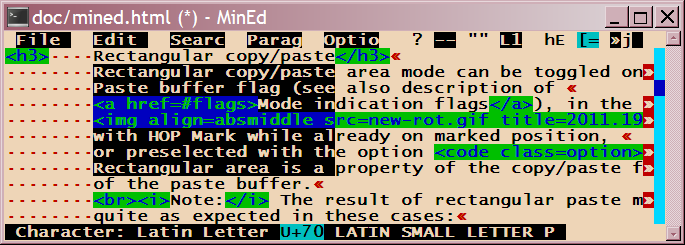
- (if on already marked position) Toggle rectangular selection.
- ^Y
or End (on right keypad) or Shift-End
or Copy (sun) or Do (VT100)
- Copy selected text (between mark and current position)
to paste buffer.
- If rectangular copy/paste mode is selected: Copy rectangular area
spanned by mark and current position to paste buffer.
- … with HOP:
- Append to buffer.
- ^U
or Del (with visual selection) or Shift-Del (small keypad)
or Cut (sun) or Remove (VT100)
- Cut selected text (between mark and current position)
to paste buffer.
- If rectangular copy/paste mode is selected: Cut rectangular area
spanned by mark and current position to paste buffer.
- … with HOP:
- Append to buffer.
- ^P or Ins or Ctrl-Ins
or Paste (sun) or InsertHere (VT100)
- Paste contents of paste buffer to current position.
- If rectangular copy/paste mode is selected: Paste contents of paste buffer
as rectangular area to current position and corresponding positions
of subsequent lines.
- With ^P or Ctrl-Ins, the cursor is placed before the pasted region.
With Ins, the cursor is placed behind the pasted region
unless the option
-V was used.
In rxvt, with Ins on the left keypad, the cursor is placed
before (left of) the pasted region.
- … with HOP: (e.g. HOP Ins or ^G^P)
- Paste from inter-window buffer.
Thus you can quickly copy text from one invocation
of mined to another.
- Shift-Ins (Windows/cygwin version)
- Insert text from Windows clipboard, adapting lineend types.
- With Ctrl-Shift-Ins, the cursor is also placed before the pasted region.
- Alt-Ins or Ctrl-F4
- Replace text just pasted with preceding paste buffer.
This command uses a ring of paste buffers (like emacs "yank ring").
- ESC b or Shift-F4
- Copy contents of paste buffer into a file.
- … with HOP:
- Append to file.
- ESC i or F4
- Insert file at current position.
Print from File menu
- Print text being edited (to default printer).
- HOP ESC ! or (deprecated) ESC c
- Invoke operating system command (prompted for) with paste buffer as input.
Search
- Note on case-insensitive searching
- Mined applies case-insensitive search pattern matching where
the search pattern contains small characters, unless when
searching for an identifier (current identifier occurence, HOP
F8, or identifier definition, Alt-t). For a case-sensitive
search for a small letter, use a single-letter range
expression like
[x] or a backslash escape
like \x (note, however, that \n and
\r have special meaning).
- ESC / or Find or F7 or F8 or / (on keypad)
- Search forward (prompt for regular expression).
- … with HOP:
- Search for current identifier.
- ESC \ or Alt-F7 or Alt-F8 or Alt-/ (on keypad)
- Search backward (prompt for regular expression).
- HOP F8 or Shift-F9
- Search for current identifier.
- HOP Alt-F8 or Alt-Shift-F9
- Search for current identifier backward.
- HOP Shift-F8 or ESC t or Alt-t
- Search for definition of current identifier (using tags file),
or open file referred to.
See ESC t below for further description.
- HOP Ctrl-Shift-F8
- Search for identifier definition (prompts for identifier).
- HOP Ctrl-F8 or Ctrl-Shift-F9
- Search for current character.
- ^N or F9
- Search for next occurence (using previous
search expression and direction).
- … with HOP:
- Repeat last but one search; two alternating
search expressions can be used with this command.
- Alt-F9
- Search again (for last expression) but in the opposite
direction.
- ESC , or Shift-F8
- (Global) Substitute (prompt for search and replacement strings).
- ESC r or Ctrl-F8
- (Global) Replace with confirmation prompting (first prompt
for strings).
- ESC R or Ctrl-Shift-F8
- (Line Replace) Substitute on current line (prompt for strings).
- ESC ( or ESC ) or ESC { or ESC }
- Perform one of the following matching searches, depending on text:
- Search for corresponding bracket matching the bracket
at current position in one of the pairs (), [], {}, <>, «».
(Nested matching bracket pairs are skipped.)
- In an HTML or XML file, search for matching tag (nesting considered).
- Search for matching /* */ comment delimiter.
- Search for matching #if #else/#elif #endif structures
(nesting considered).
On an #else or #elif directive, the search direction depends
on the command character, i.e. ESC ( searches backward, ESC )
searches forward.
- In a mailbox file, on any mail header line, search for
next or previous mail message, depending on the command character,
i.e. ESC ( searches backward, ESC ) searches forward.
- In a mailbox file or saved mail message, on a MIME separator,
search for next or previous MIME separator, depending on the
command character, i.e. ESC ( searches backward, ESC ) searches forward.
- ESC t or Alt-t or HOP Shift-F8
- Search for and move to the location of the definition of
identifier at the current cursor position. This command
uses the tags file that can be generated with the
ctags command (Unix).
It opens another file if necessary and automatically saves
the current file then.
On an include statement (line beginning with "include"
or "#include"), the command opens the included file.
Like with a number of positioning commands, ESC t places
the current position on the position marker stack before going
to the location of the identifier definition. The command ESC
Enter (Alt-Enter) can move back to that position, even if
edited files were changed with the command.
- HOP ESC t or HOP Ctrl-Shift-F8
- Similar, but prompts for identifier.
- HOP ESC ( or Alt-F11
- Search for a character encoded in the "wrong encoding",
i.e. a UTF-8 character in Latin-1 mode, or a Latin-1 character
in UTF-8 mode.
Search expressions: Special functions
- .
- matches any character
- ^
- (at begin of pattern) restricts match to the begin of a line
- $
- (at end of pattern) restricts match to the end of a line
- [< character set >]
- matches any one of a set of characters;
the set may be given by listing elements,
denoting a range < c1 >...< c2 >,
or negating the whole set [^< character set >]
- \< character >
- matches the character literally (except n or r)
- < pattern >*
- (a star appended to a plain character of any of the
patterns above)
matches a repetition of this pattern (zero or more times);
not applicable to line end patterns
- ^V^J (a literal linefeed character, entered with ^V prefix)
- searches for any real newline
(to be used embedded in the search pattern, does not match on last line)
- \n
- searches for a Unix newline (LF)
(to be used embedded in the search pattern, does not match on last line)
- \r
- searches for DOS/Windows newline (CRLF)
(to be used embedded in the search pattern, does not match on last line)
- \R
- searches for Mac newline (CR)
(to be used embedded in the search pattern, does not match on last line)
- \0
- searches for NUL character, represented as a pseudo line end
- ^V^M
- searches for CR (carriage return) character
embedded in a line
Replacement strings: Special functions
- &
- is replaced by the matched pattern to be replaced
- ^V^J or \n
- (a linefeed character) embeds a newline
(LF character) in the replacement string
- \r
- (a carriage return character) embeds a CR
character in the replacement string
To change the line end type of a line or all lines, use
"Lineend type..." from the Options menu.
File operations
- ESC w or F2
- Save (write back) current text to file (only if modified).
Save file information (editing position etc),
create file info file if needed.
- … with HOP:
- Save current file position and other editing information
in file info file, so that subsequent editing sessions will
start at the current position and remember formatting parameters.
- ESC W or Shift-F2
- Save (write back) current text to file (unconditionally).
Also enable memory for file positions in current directory
(creates file info file).
- Alt-F2
- Save As; save current text to file with different name;
file permissions (access modes) are preserved and cloned.
- Ctrl-Shift-F2 or HOP Shift-F2
- Save to file, and enable memory for file positions in
current directory (creates file info file).
- F3
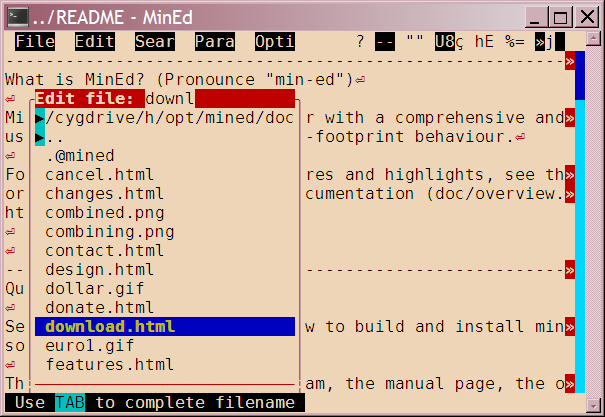
- Edit another file (prompt for save if current text changed).
- Ctrl-F3 or ESC v
- View another file (prompt for save if current text changed).
- ESC V
- Toggle between edit mode and view only mode.
- ESC q
- Quit the editor (prompt for save if current text changed).
- ESC ESC or Ctrl-F2
- Exit editing current text (save first if changed), continue
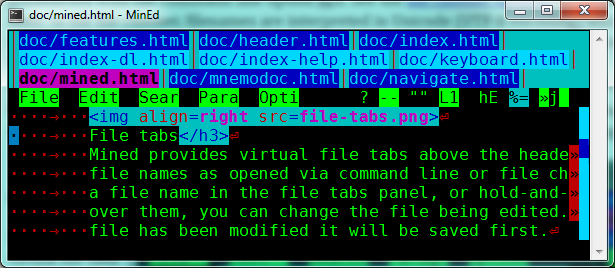
with the next file (from the File switcher list);
exit mined if there is no subsequent file to edit.
- Note: If a file name occurs on the command line multiple
times (explicitly or by wildcard expansion), file list navigation
is not linear.
- Note: There is a small delay after typing ESC ESC.
(This is in order to enable recognition of Alt-function key
combinations which are implemented by some terminals or
terminal modes by prefixing ESC to the function key escape
sequence.) This delay can be avoided by using Ctrl-F2.
- ESC +
- Edit the next file (from the File switcher list)
- Note: If a file name occurs on the command line multiple
times (explicitly or by wildcard expansion), file list navigation
is not linear.
- … with HOP:
- Edit the last file.
- ESC –
- Edit the previous file (from the File switcher list)
- … with HOP:
- Edit the first file.
- ESC #
- Ask for index into the list of files and edit that file.
- ^G N # or ESC g N #
- Edit Nth file.
(^G N f also works.)
- ESC # #
- Reload file currently being edited.
Menu
- ESC Space or Alt-Space or Shift-F10
- Open Popup menu.
- ESC F10 or Alt-F10 or Ctrl-F10
- Open first flag menu (Info menu).
- ESC f or Alt-f or F10
- Open File menu.
- ESC < letter > or Alt-< letter >
- Open menu.
- ESC I or Alt-I or ESC K or Alt-K or Ctrl-F12
- Open the Input Method selection menu.
- (Alt-I/Alt-K/Ctrl-F12 also works on prompt line)
- ESC Q or Alt-Q
- Open the Smart Quotes selection menu.
- ESC E or Alt-E
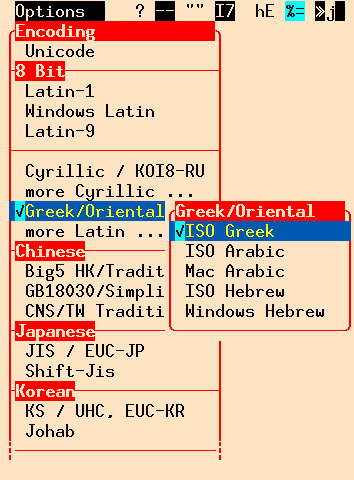
- Open the Encoding selection menu.
Miscellaneous
- ESC = < count >
- Repeat a command < count > times (prompts for count).
- Example: ESC=7< cursor down > moves the cursor
7 lines down.
- Note: If the function to be repeated is a character
to be inserted and the input is keyboard mapped to a
multi-character sequence, only the first character of the
sequence is inserted repeatedly.
- ESC < count >
- Repeat a command < count > times (prompts for rest of count);
this short form is only accepted, however, if the repeat count
consists of at least two digits (this is to avoid confusion with
function key escape sequences of certain terminals).
- Example: ESC77. enters a line of 77 dots,
ESC07x enters "xxxxxxx".
- ^V < function key >
- Invoke function as if pressed together with the control key.
E.g. ^V < cursor-left > moves left into the parts of a
combined character just like Ctrl-cursor-left would do
(the latter may depend on proper terminal setup).
- ^\
- Abort current command, e.g. while on prompt line.
- ESC ?
- Show the current status of the file (name, whether modified,
current line, number of lines, characters, and bytes).
- … with HOP:
- Toggle permanent display of text status line.
Note that when editing a file that does not fit completely in
memory (e.g. large file on old system), this option may cause
considerable swapping. In that case, do not use the feature.
- ESC u
- Display the character code of the current character
in the bottom status line.
(In UTF-8 encoded text mode, both the UTF-8 byte
sequence and the Unicode value are displayed; in CJK
or mapped 8 bit encoded text mode, Han or 8 bit
character values and corresponding Unicode values are
displayed when applicable.)
In non-Latin-1 encoded text mode, additional Unicode
information is included, indicating the script,
character category, width, combining, and surrogate
properties of the character.
- … with HOP:
- Toggle permanent character code display.
- ESC T
- Toggle Tab width.
Alternates the width interpretation of Tab characters
between 2-4-8.
- … with HOP:
- Toggle Tab expansion (input substitution with spaces).
- ESC P
- Set page length (number of lines that mined assumes to
be on a page). (Useful for status display.)
- ESC a
- Toggle append mode (append to text buffer/file instead of
overwriting).
- ESC d
- Show current directory / change to another one
(also change drive in MSDOS version).
The assumed (relative) file path name
as well as file permissions (access modes) are preserved.
- ESC n or
Set Name... from File menu
- Change the file name associated with the text being edited;
the file is not actually saved yet but only the new
file name is used for saving the next time.
The text is detached from the file previously loaded
which is not affected.
All current text editing properties (assumed
encoding, smart quotes style, margins, ...)
as well as file permissions (access modes) are preserved.
- ESC .
- Redraw the screen.
- Alt-F12
- (In terminals that support an alternate screen view:)
Switch to normal screen (to view command line history and possibly
mouse-copy/paste) until next input.
- ESC l
- Make screen lower (decrease number of screen lines).
- ESC L
- Make screen higher (increase number of screen lines).
- ESC %
- Make screen smaller (decrease screen size).
- ESC &
- Make screen bigger (increase screen size).
- Shift-keypad-Minus
- Make font smaller. (Works in mintty and natively in xterm.)
- Shift-keypad-Plus
- Make font bigger. (Works in mintty and natively in xterm.)
- ESC z
- Suspend editor process; first write back file if modified
(no write if HOPped or given empty file name on prompting).
- Mined detects (by checking process and group IDs and terminals)
whether it is safe to suspend and rejects it otherwise (e.g. if it
is run embedded within a terminal, without underlying shell,
or from a shell script).
- ESC !
- Fork off a shell and wait for it to finish.
- … with HOP:
- Invoke operating system command (prompted for) with paste buffer as input.
- F1 or Help or Alt-h or ESC h
- Interactive help function.
Selection of help topics is offered and prompted;
after entering the initial letter, the respective
help section is shown.
If another (modified) F1 key, a modified digit key,
or a Ctrl-modified punctuation key is entered,
a corresponding key assignment help bar is displayed
(see F1 F1 etc. below).
The help file mined.hlp is
installed with the
Mined runtime support library. If
this is not installed in one of the standard locations,
the environment variable MINEDDIR should be set to
point to the directory so mined can find its help file.
- F1 F1 or Shift-F1 or Ctrl-F1 or Alt-F1 or Ctrl-Shift-F1 or Alt-Shift-F1
- Display a help bar (in the bottom status line) with short
indications of the functions assigned to the function keys
F2... in the corresponding modified mode (i.e. with Control,
Shift, and Alt as requested for the help bar).
- … with HOP:
- Toggle permanent help bar display.
- F1 Ctrl-1 or F1 Alt-1 or F1 Alt-Ctrl-1
- Display a help bar (in the bottom status line) with short
indications of the accent prefix functions assigned to the
digit keys 1..9, 0 in the corresponding modified mode
(i.e. with Control and Alt as requested for the help bar).
- … with HOP:
- Toggle permanent help bar display.
- F1 Ctrl-< punctuation key > e.g. F1 Ctrl-,
- Display a help bar (in the bottom status line) with short
indications of the accent prefix functions assigned to the
Ctrl-modified punctuation keys.
- … with HOP:
- Toggle permanent help bar display.
- ESC
- While a command is active and prompting (e.g. for a search
expression), ESC aborts the current command.
- ESC Space
- Do nothing, so the Space key aborts the ESC command.
MSDOS keyboard functions
- Ctrl-Alt-Space
- Set mark (to remember the current location).
- Alt-TAB (not in Windows)
- HOP / Go to.
- Ctrl-* (on keypad)
- HOP / Go to.
- Ctrl-/ (on keypad)
- Search forward.
- Alt-/ (on keypad)
- Search backward.
- Screen size change functions
- MSDOS screen size changes depend on a table of common
VGA video modes (dosvideo.t).
In the presence of a TSR driver which can change fonts and
screen modes while running a program (e.g. the
excellent VGAMAX), the actual change effective may
occasionally be unexpected. Mined recognises such changes
after the next character input and adjusts to them.
- Alt-– (on keypad)
- Change video lines mode to the mode with the next smaller
number of lines but same number of columns.
(The number of lines is first tried to be decreased
within the current video mode. If it is already
the lowest, the next video mode is chosen.)
- Alt-+ (on keypad)
- Change video lines mode to the mode with the next higher
number of lines but same number of columns.
- Ctrl-– (on keypad)
- Change video mode to the mode with the next smaller
total resolution (lines * columns).
- Ctrl-+ (on keypad)
- Change video mode to the mode with the next higher
total resolution.
- HOP Ctrl-/Alt- +/– (on keypad)
- Several other video mode settings are prompted for
(experimental).
Emacs mode
Mined emulates emacs keyboard layout and some specific functions if
invoked with the option -e or with the
command name alias minmacs.
In emacs mode, emacs command key assignments to control keys,
ESC (Meta commands) and ^X (C-X commands) are configured.
In addition, the following emacs-compatible changes apply:
- The mined ESC commands can be reached via M-x.
(Function keys remain unaffected.)
- The Del key (on the small keypad) is configured to
delete the previous character.
- The control key insertion prefix is ^Q.
- The quit character (e.g. for the prompt line) is ^G.
- The emacs multiple buffer ring is fully enabled.
- Paragraph justification mode is set to consider an empty line
as paragraph separation by default.
- Mined ESC commands can be reached via M-x (Alt-X).
- ^\ (Ctrl-\) is interpreted as an additional HOP key.
- Keyboard mapping (input method) can be toggled with Ctrl-Alt-F12
Command overview:
- ^A, ^B, ^E, ^F, ^N, ^P, ^V, M-v, M-b, M-f, M-a, M-e, M-< , M->, ^X[, ^X]
- cursor and screen movement
- ^D
- delete character
- ^O
- insert new line
- ^Q
- insert literal character
- ^@
- mark position
- ^W / M-w
- cut / copy to buffer
- ^K
- delete to end of line / delete line end, and append to buffer
- M-d / M-k
- delete word / delete end of sentence, and append to buffer
- ^Y
- paste buffer
- M-y
- paste previous buffer, replacing text just pasted
- M-u
- transform word upper-case
- M-l
- transform word lower-case
- M-c
- transform word capitalised (initial upper-case)
- ^S, ^R
- search forward / reverse
- M-%
- replace with confirmation
- M-.
- search for identifier definition (using tags file)
- ^X^S, ^Xs
- save file
- ^X^W
- save file as (using different name)
- ^X^F
- edit other file (prompts for name)
- ^X^B
- edit previous file (among those listed on command line)
- ^X^C
- quit editor, prompt for saving text first
- ^Xk
- discard current edit buffer (after confirmation), open new one
- ^Xi
- insert file
- ^X=
- display file statistics
- ^L
- refresh display
- ^U, ^X^[
- repeat (not as generic numeric command parameter)
- ^H
- help
- ^Z, M-z, ^X^Z
- suspend editor
- ^\ (mined add-on)
- HOP (generic function amplifier / expander)
- M-x (Deprecated mined add-on)
- invoke mined ESC command
- ESC ESC (mined add-on)
- invoke mined ESC command
Windows keyboard mode
Mined emulates typical Windows control key functions if
invoked with the option +ew;
this is enabled automatically when invoking mined via the
wined.bat script or from the Windows explorer
context menu of a text file.
The usual Escape commands and function key assignments of mined
also apply in Windows keyboard mode. Also, ^@ and ^_ are included
to provide the respective functionality.
- ^@
- mark position
- ^C
- copy selected text area (between marked and current position)
- ^F
- search
- ^G
- goto
- ^H
- replace (with confirm)
- ^O
- open other file
- ^P
- print
- ^Q
- quit
- ^S
- save file
- ^V
- paste
- ^W
- close file
- ^X
- cut selected text area (between mark and current position)
- ^_
- insert control character
WordStar mode
Mined emulates WordStar keyboard layout and some specific functions if
invoked with the option -W or with the
command name alias mstar.
The usual Escape commands and function key assignments of mined
also apply in WordStar mode.
In prefixed two-key commands, the control state and case of the second
key does not matter, e.g. ^K^B, ^KB and ^Kb are identical.
- ^S, ^D, ^E, ^X, ^A, ^F, ^R, ^C, ^W, ^Z, ^H
- cursor and screen movement
- ^G
- delete character
- ^T
- delete word
- ^Y
- delete line
- ^Q^Y
- delete to end of line
- ^N
- insert new line
- ^P
- insert control character
- ^Q^W, ^Q^Z
- scroll multiple screen lines
- ^Q^F
- find
- ^Q^A
- find and replace (with HOP: with confirm)
- ^L
- repeat last search
- ^Q
- HOP key
- ^Q, ^K, ^O
- two-key command prefixes
- ^Q^Q
- repeat following command
- ^B
- paragraph justification (word wrap)
- ^OL
- set left margins
- ^OG
- set left margin for first line of paragraph
- ^OR
- set right margin
- ^KB
- set marker
- ^QB
- goto marker
- ^Kn
- (n=0..9) set marker n
- ^Qn
- (n=0..9) goto marker n
- ^KK
- copy between here and marker (not exactly WS function)
- ^KC
- copy (paste) saved text here (not exactly WS function)
- ^KY
- delete between here and marker (not exactly WS function)
- ^KV
- copy (paste) saved text here (not exactly WS function)
- ^KW
- write paste buffer to file
- ^KR
- read (insert) file here
- ^KS
- write (save) edited text to file
- ^KD
- write (save) edited text to file, edit next file
- ^KX
- exit (and save)
- ^KQ
- quit (don't save)
- ^KL
- change current directory
|
 Rectangular copy/paste
 File chooser
 File tabs
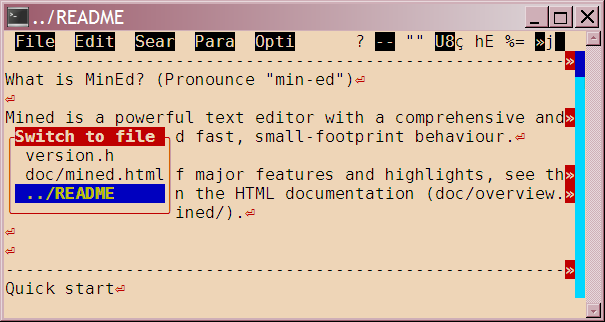 File switcher
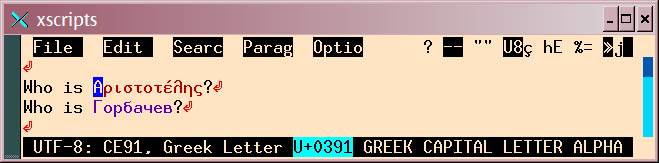 It may be desirable to distinguish characters in different
script by displaying their glyphs in different colours.
(This especially allows to distinguish easier between
similar glyphs as they occur in Latin/Greek/Cyrillic scripts.)
It may be desirable to distinguish characters in different
script by displaying their glyphs in different colours.
(This especially allows to distinguish easier between
similar glyphs as they occur in Latin/Greek/Cyrillic scripts.)
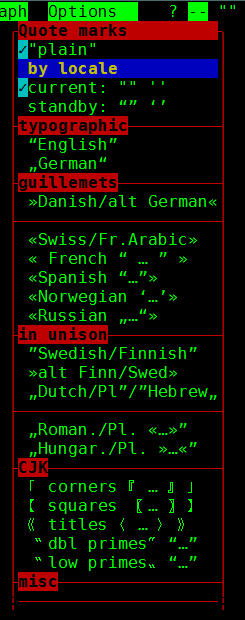 In Smart quotes mode, straight (double or single) quote
characters «"» or «'» are automatically substituted with an
opening or closing typographic quotation mark, depending on
the text context, or an apostrophe where appropriate.
Also, an acute accent key enters a typographic apostrophe.
In Smart quotes mode, straight (double or single) quote
characters «"» or «'» are automatically substituted with an
opening or closing typographic quotation mark, depending on
the text context, or an apostrophe where appropriate.
Also, an acute accent key enters a typographic apostrophe.
 xterm
xterm